
How Can We Help?
Audio Visual Solutions
- Articles coming soon
- Articles coming soon
- Articles coming soon
- Articles coming soon
- Articles coming soon
- Articles coming soon
- Articles coming soon
- Articles coming soon
- Articles coming soon
- Articles coming soon
- Articles coming soon
Document Solutions
- Articles coming soon
Mailing Solutions
- Articles coming soon
Security Solutions
- Articles coming soon
Telecom Solutions
- Articles coming soon
Service
- Articles coming soon
Billing
- Articles coming soon
< All Topics
Print
UpdatedApril 30, 2024
Change Password
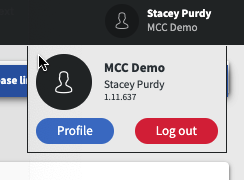
To change your password, click on your name in the top right corner and click on Profile.
Enter your current password in the old password field in the Profile settings. Then, enter your new password in the New Password field and confirm the new password in the Password Again Field. Then click Save.
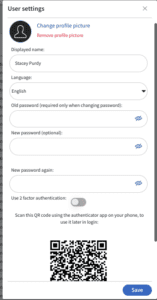
Table of Contents