
Document Management Software & Workflow Solutions
Stop searching through shared drives, email attachments, filing cabinets and disconnected systems.
MCC helps organizations centralize documents, control access, improve search and retrieval, and automate the manual steps that slow work down. Our document management solutions are designed around the way information actually moves through your business—not around a one-size-fits-all software package.
Whether you need secure document storage, automated approvals, searchable records, electronic forms or a more complete document workflow, MCC can help you identify the right approach and implement it across your organization.
Document management and workflow solutions for businesses and organizations across Tennessee and Mississippi.
WHEN DOCUMENTS BECOME A BUSINESS PROBLEM
Your Documents May Be Digital. Your Process May Still Be Manual.
Moving files from filing cabinets to shared drives solved one problem. It did not necessarily solve document management.
Many organizations still rely on employees to manually name files, decide where documents belong, email attachments for approval, chase coworkers for updates, search through folders for the latest version and re-enter information from one system into another.
That creates problems such as:
- Employees wasting time searching for documents
- Multiple versions of the same file in different locations
- Important records trapped in email inboxes
- Manual approval processes that are difficult to track
- Inconsistent naming and filing practices
- Limited visibility into document status
- Sensitive information accessible to the wrong users
- Paper records taking up valuable office space
- Repetitive data entry between systems
- Processes that depend too heavily on individual employees knowing “how we always do it”
A Document Management System can replace many of these disconnected steps with a controlled, searchable and repeatable process.

What Is a Document Management System?
Document Management Software, often called a Document Management System or DMS, is technology used to capture, organize, store, secure, track and retrieve business documents from a centralized system.
Unlike basic file storage, a DMS can support structured business processes around those documents. Depending on the platform and configuration, that may include indexing, OCR, version control, permissions, audit histories, automated routing, approvals, retention rules, electronic forms and integrations with other business systems.
The goal is not simply to create another place to save files.
The goal is to make documents easier to find, safer to manage and more useful within the workflows that depend on them.
Want the full introduction? Read What Is DMS and Why Is It Important?
How Document Management Works
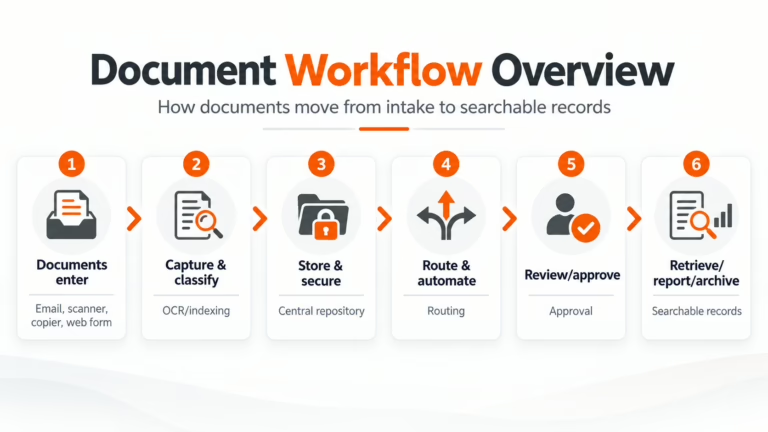
Documents rarely begin and end in the same place. They arrive through different channels, pass between employees and departments, trigger actions and eventually become business records.
A well-designed document management workflow connects those steps.
-
Documents Enter
Email • Scanner • Copier • Uploaded File • Web Form • Electronic Document
-
Capture & Classify
OCR • Data Capture • Indexing • Document Type • Metadata
-
Store & Secure
Central Repository • Permissions • Version Control • Audit History
-
Route & Automate
Business Rules • Notifications • Assignments • Escalations
-
Review & Approve
Approvals • Exceptions • Collaboration • Status Tracking
-
Retrieve, Report & Archive
Search • Reporting • Retention • Records Access • Archive
CORE CAPABILITIES
What Should Document Management Software Be Able to Do?
1. Document Capture & OCR
Bring documents into the system from scanners, multifunction copiers, email, uploaded files, electronic forms and other sources.
OCR and data-capture capabilities can make scanned information searchable and reduce the amount of information employees have to enter manually.
2. Indexing and Search
Documents should be organized in a way that makes sense to the people who need them.
Index fields, metadata and full-text search can help employees find records by criteria such as customer, vendor, invoice number, employee, date, document type or other relevant information.
3. Access Controls
Not every employee should see every document.
Role-based permissions can help control who is allowed to view, edit, approve or manage particular information.
4. Version Control
A DMS can maintain document revisions so employees are less likely to work from an outdated attachment or duplicate copy stored somewhere else.
5. Workflow Automation
Documents can be automatically routed to the appropriate person or department based on defined rules.
That can include approvals, notifications, reminders, escalations, exception handling and other repeatable actions.
6. Audit Trails
Organizations often need visibility into what happened to a document, who accessed it, what changed and where it moved during a process.
Audit history can make that activity easier to review.
7. Forms & Data Capture
Electronic forms can replace paper forms, emailed PDFs and spreadsheets while sending captured information directly into the appropriate workflow.
8. Retention & Records Management
Depending on the platform, document retention policies can help organizations manage when information should remain active, be archived or be disposed of according to internal requirements.
8. Integration With Business Systems
Document management becomes more useful when it works with the systems employees already use.
Depending on the solution and requirements, workflows may connect with accounting, ERP, HR, CRM or other business applications so employees do not have to manually move information from system to system.
REAL BUSINESS WORKFLOWS
What Can You Automate With a Document Management System?
The easiest way to understand DMS is to stop thinking about documents as files and start thinking about the business process surrounding them.
Accounts Payable
An invoice arrives by email or scan, data is captured, the invoice is routed for coding and approval, exceptions are flagged and the final record is stored for later retrieval.
Human Resources
Employee files, onboarding documents, forms and other records can be organized with controlled permissions and consistent document classifications.
Contracts
Contracts can be captured, routed for review, tracked through approval and stored in a searchable repository instead of scattered across inboxes and shared folders.
Customer and Client Records
Documents can be indexed to the appropriate customer, account, project or case so employees can retrieve the information they need without searching multiple systems.
Purchase Requests
A request can begin with an electronic form, route to the appropriate manager, move through approval and purchasing steps, and maintain the supporting documentation with the transaction.
Compliance and Administrative Records
Organizations that manage large volumes of policies, forms, certifications and regulated records can use structured workflows to improve consistency and accountability.
The right workflow depends on the organization. MCC starts by understanding how the process works today before recommending how software should change it.
COMPARISON SECTION
Document Management System vs. Shared Drives and Basic Cloud Storage
Shared drives and cloud-storage platforms are useful tools. But storing files is not the same thing as managing the processes surrounding them.
| Capability | Shared Drive/Basic Cloud Storage | Document Management System |
|---|---|---|
|
Central file storage |
Yes |
Yes |
|
File Sharing |
Yes |
Yes |
|
Full-text/OCR search |
Limited |
Yes |
|
Structured indexing and metadata |
Limited |
Yes |
|
Advanced version management |
Limited |
Yes |
|
Granular role-based permissions |
Basic to moderate |
Yes |
|
Automated document routing |
Limited |
Yes |
|
Approval workflows |
Limited |
Yes |
|
Audit History |
Limited |
Yes |
|
Automated data capture |
Limited |
Yes |
|
Electronic forms |
Limited |
Available |
|
Retention workflows |
Limited |
Yes |
|
Business-system integrations |
Limited |
Available |
|
Process Automation |
Limited |
Yes |
A basic storage platform may be perfectly adequate for organizations with simple requirements.
A DMS becomes more valuable when employees need structured access, automated workflows, better search, document controls or visibility into what happens after a file is created.
How to Choose the Right Document Management System
There is no universally “best” document management platform.
The better question is: Which system fits the way your organization creates, uses, approves and stores information?
Before selecting DMS software, consider:
Do employees struggle to find files? Are approvals too slow? Are documents stored in too many places? Are paper records still creating problems?
Start with the operational problem—not a feature checklist.
Identify whether information arrives through email, scanners, copiers, forms, customer portals, business applications or other sources.
Determine which information employees use to locate records: customer, account, employee, invoice, project, date, location, department or document type.
Different departments and roles may require different levels of visibility and control.
Map approvals, routing, review, notifications, exceptions, signatures, retention and other process steps.
If the workflow depends on an ERP, accounting platform, CRM, HR system or another application, integration requirements should be identified before implementation.
A technically impressive solution that makes everyday work harder is not much of a solution.
User experience, training and adoption should be part of the decision.
Depending on the selected solution and your environment, MCC can support cloud, on-premise or hybrid document technologies.
Your infrastructure, security requirements, internal IT resources and workflow should determine the architecture—not whatever deployment model happens to be fashionable this quarter.
Document Management Solutions Built Around Your Workflow
MCC works with document management and workflow technologies designed to help organizations capture, organize, secure and automate information.
Solutions within MCC’s document technology portfolio can include platforms such as Square 9, along with complementary capture, scanning, automation and business-process technologies selected according to the requirements of the project.
Potential capabilities include:
- Document capture and OCR
- Searchable digital repositories
- Workflow automation
- Electronic forms
- Approval routing
- Security and permissions
- Document indexing
- Version management
- Reporting and audit history
- Integrations with other business applications
- Cloud, on-premise and hybrid deployment options
The platform matters.
But software selection should come after the workflow has been understood.
MCC DIFFERENTIATOR
MCC Doesn't Start With the Software
You do not need to know which DMS platform you need before talking with MCC. You only need to know where the current process is creating friction. MCC can start there.
Our workflow-first approach focuses on understanding what happens today, identifying unnecessary manual steps and designing a more effective way for information to move through your organization.
That means the goal is not to squeeze your workflow into a predefined software template. The goal is to configure technology around a process that makes sense for your business.
Implementation Process
1. Discovery
We review the current process, users, document types, systems, pain points and desired outcome.
2. Workflow Mapping
We document how information enters the organization, where it goes, who touches it and what decisions or approvals occur along the way.
3. Requirements and Solution Design
MCC identifies capture, storage, security, workflow, integration and deployment requirements and recommends an appropriate approach.
4. Migration and Configuration
Depending on the project, implementation may include document migration, indexing structures, user permissions, workflow rules, forms, integrations and other configuration.
Organizations with large volumes of existing paper records may also benefit from back-file scanning.
5. Testing
Workflows should be tested against real-world scenarios before becoming part of everyday operations.
6. Training
Employees need to understand not only how to use the system but how it fits into their day-to-day work.
7. Ongoing Support
Business processes change.
MCC can continue supporting the solution as users, requirements and workflows evolve.
Document Management for Document-Heavy Industries
Almost every organization manages documents, but some industries feel the pain more quickly because of volume, security requirements or complex workflows.
MCC document management solutions can support workflows in areas such as:
Administrative records, forms, HR documents, invoices and other information that must be organized and accessible to authorized users.
Matter-related files, correspondence, contracts, records and other document-intensive processes.
Customer documentation, approvals, contracts, administrative records and controlled workflows.
Student, administrative, HR, financial and operational records across schools, colleges and other educational organizations.
High-volume records, forms, departmental workflows and information that may require consistent retention and access controls.
Document Management Solutions Across Tennessee and Mississippi
Technology may live in the cloud, but implementation still happens inside a real organization with real employees, systems and processes.
MCC provides document management and workflow automation services for organizations throughout Tennessee and Mississippi.
Our regional teams support businesses and organizations from MCC locations serving the greater Memphis, Nashville/Brentwood, Jackson, Tennessee, and Ridgeland, Mississippi markets.
Whether the project supports one department, one office or multiple locations, MCC can help evaluate the workflow, recommend an appropriate solution and support the implementation.
Document Management Is Often One Piece of a Larger Workflow
Documents do not exist in isolation. The right solution may involve more than DMS software alone.
Depending on the workflow, MCC can also help with:
Frequently Asked Questions
Document management software is a system used to capture, organize, store, secure, track and retrieve electronic documents. More advanced document management systems can also support workflow automation, document routing, approvals, audit histories, electronic forms and integrations with other business applications.
No. Cloud storage primarily provides a place to save and share files. A document management system can add structured indexing, advanced permissions, version management, audit history, workflow automation, retention processes and other tools designed around business document workflows.
For organizations with simple storage requirements, basic cloud storage may be enough. DMS becomes more valuable as document volume and process complexity increase.
Yes. Depending on the platform and configuration, documents can be automatically routed to specific users or departments for review and approval. Workflows can also include notifications, reminders, escalation rules and exception handling.
Often, yes. Integration possibilities depend on the document management platform and the systems involved. MCC reviews integration requirements during discovery so they can be considered before the solution is designed.
It can significantly reduce reliance on paper, but becoming completely paperless is not always necessary or practical.
The better objective is to digitize the documents and processes where doing so creates meaningful improvements in access, security, efficiency or workflow.
Organizations with large archives of paper records may also use back-file scanning to convert existing documents into electronic files.
No. The value of DMS depends more on the complexity and volume of the process than the size of the organization.
A smaller business with approval-heavy or document-intensive workflows may benefit more from DMS than a much larger organization with relatively simple requirements.
A properly configured DMS can improve document control through capabilities such as permissions, authentication, audit history, version management and centralized storage.
The appropriate security configuration depends on the selected platform, deployment environment and organizational requirements.
DMS pricing varies based on factors such as the platform, number of users, document volume, storage requirements, workflows, forms, integrations, migration needs and deployment model.
MCC begins by reviewing the process and requirements so the proposed solution is based on what the organization actually needs.
Yes. MCC’s process begins with the workflow rather than requiring customers to select software first.
We can review your existing document process, identify areas where automation or better document control may help, and recommend an approach based on your operational, technical and deployment requirements.
Stop Managing Documents One Manual Step at a Time
You do not need another folder.
You need a better way to capture information, find it when you need it and move it through the people and processes that depend on it.
MCC can help you evaluate your current document workflow, identify bottlenecks and determine whether document management software, workflow automation or another document solution is the right next step.
Schedule a Document Workflow AssessmentCall 866-805-5893Latest News
Catch up on the latest industry news, product updates, and tips on how to make the most of your office technology solutions.

Lower operating costs with practical office tech—postage meters, mail outsourcing, phones, print, and automation. See where savings come from and what to do first.
Continue Reading The Article
Accounts payable automation replaces these inefficiencies with faster processing, real‑time visibility, and built‑in controls. Below are six practical, measurable ways AP automation helps organizations...
Continue Reading The Article
Document Management Software (DMS) is a digital system used to store, organize, manage, and track electronic documents in a centralized, secure location. Businesses use...
Continue Reading The Article