
Commercial Security System Design, Installation & Support
A commercial security system should do more than place cameras on walls and locks on doors. It should be designed around your facility, your people, your risks and the way your organization actually operates.
MCC assesses, designs, installs, integrates and supports commercial security systems for single-site businesses and multi-location organizations. From video surveillance and access control to intrusion detection, remote alerts and centralized management, we help you build a coordinated system that provides better visibility, control and accountability.
Commercial security system design and installation is the process of evaluating a facility’s risks, planning camera coverage and controlled access, installing the required equipment and cabling, configuring system integrations, training users and supporting the system after deployment. MCC manages that process from the initial assessment through ongoing service and future expansion.
Who This Service Is Designed For
MCC’s commercial security system design and installation services are built for organizations that need more than a collection of disconnected devices.
This service may be a good fit when you are:
- Replacing an aging or unreliable security system
- Opening, renovating or expanding a facility
- Adding cameras, controlled doors or additional locations
- Struggling to manage separate security platforms
- Experiencing blind spots, false alarms or missed events
- Managing employee, contractor or visitor access manually
- Trying to improve incident documentation and accountability
- Looking for ongoing technical or administrative support
Whether you are protecting one office or coordinating security across multiple facilities, the system should be designed to match your risks and operational priorities—not forced into a generic package.

Common Problems With Poorly Planned Security Systems
Many security problems begin before the first device is installed.
A camera may technically cover an area but still fail to capture a useful face, license plate or event. An access control system may secure the doors but create a mess whenever an employee leaves. Alerts may fire constantly without providing enough context to determine whether anyone needs to respond.
Common problems include:
- Camera views blocked by lighting, shelving or building features
- Important entrances, parking areas or restricted spaces left uncovered
- Separate systems that cannot share event information
- Footage that is difficult or time-consuming to locate
- User permissions that are inconsistent across doors or locations
- Alerts that generate noise instead of useful information
- Limited storage, reporting or remote-access capabilities
- Systems that cannot expand without substantial replacement
- No clear plan for service, updates or ongoing administration
A proper security assessment identifies those risks before they turn into expensive installation mistakes.
Our Commercial Security System Process
1. Security Assessment and Discovery
The process starts with a conversation—not a catalog.
MCC works with your leadership, facilities, operations, IT and security stakeholders to understand:
- What people, property and operations need protection
- Where incidents, concerns or vulnerabilities have occurred
- How employees, visitors, contractors and deliveries move through the facility
- Who needs to view video, manage access or receive alerts
- Whether the organization has regulatory, reporting or audit requirements
- Which existing systems are working and which are creating problems
- How the organization expects to grow or change
This gives the project a defined purpose before hardware recommendations begin.
2. Site and Risk Review
A commercial security design should be based on the actual environment.
MCC reviews the areas that affect system performance, including:
- Public and employee entrances
- Emergency exits
- Parking lots and exterior approaches
- Reception and visitor areas
- Inventory, equipment and storage spaces
- Offices and restricted departments
- Loading docks and delivery entrances
- Lighting conditions and potential camera obstructions
- Existing cabling, network access and power availability
- Current cameras, door hardware, sensors and recording equipment
The goal is not simply to install more equipment. It is to identify where visibility, control or response is genuinely needed.

For a deeper look at technical capabilities, integrations, and supported workflows, explore our Business Security Systems.
3. Security System Design

After the assessment, MCC develops a security system plan built around your facility and priorities.
Depending on the project, the design may include:
- Indoor and outdoor video surveillance
- Camera placement and field-of-view planning
- Controlled doors and restricted areas
- Employee, visitor and contractor access
- Intrusion detection and alarm monitoring
- Real-time alerts and event notifications
- Video storage and retention requirements
- Remote and mobile system access
- Multi-location management
- Environmental or temperature monitoring
- Reporting, user permissions and audit trails
- Integration with existing compatible systems
The design should also account for how the system will be managed after installation. A technically impressive system that no one can operate is just an expensive wall decoration.
4. Professional Installation and Cabling
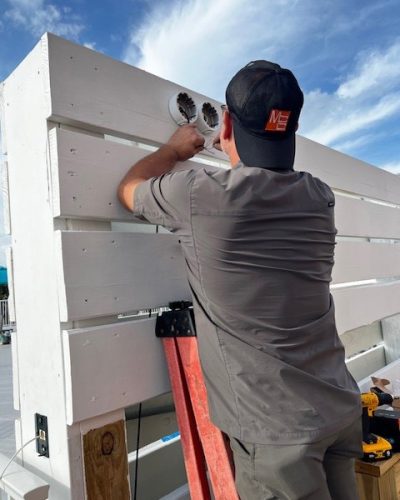
MCC coordinates the physical installation of cameras, readers, controllers, sensors, recording equipment and supporting infrastructure.
Installation planning includes:
- Confirming equipment locations before work begins
- Coordinating installation around business operations
- Installing or connecting the required cabling
- Mounting and positioning equipment
- Configuring network-connected components
- Connecting doors, sensors and related devices
- Verifying power, communication and recording
- Documenting installed equipment and system settings
The project is tested as a functioning security environment—not treated as a pile of individual devices that happen to share a building.
5. Integration With New and Existing Systems
Cameras, access control, alarms and alerts are more useful when they share information.
For example:
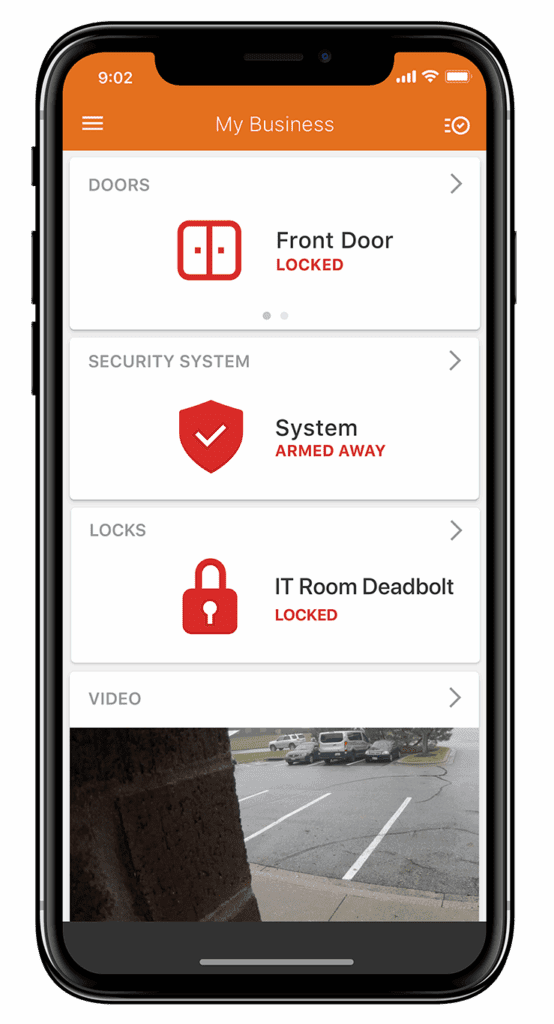
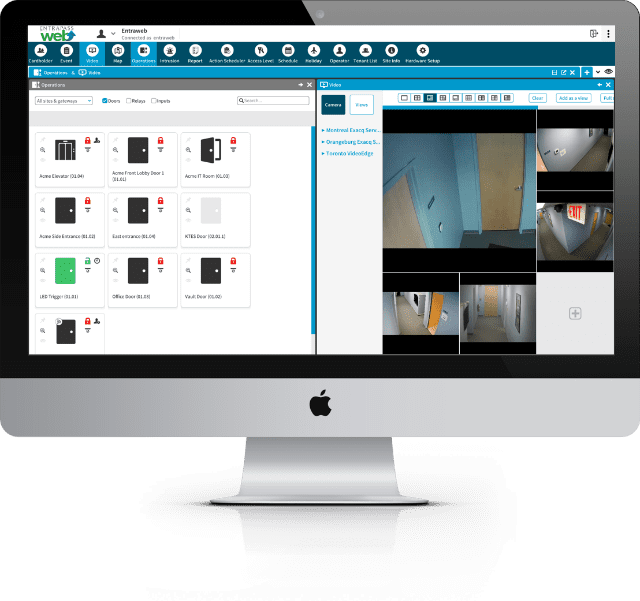
- A door-access event can be connected to the corresponding video
- An unusual after-hours entry can trigger an alert and recorded clip
- A delivery can be visually verified before a door is unlocked
- A closing routine can secure doors, arm the building and adjust connected systems
- A manager can review activity across multiple locations from one interface
- Temperature or environmental alerts can identify risks to equipment or inventory
Where practical, MCC evaluates whether compatible existing infrastructure can remain in use. When replacement is necessary, the reason should be technical or operational—not because someone got carried away with the sales proposal.
The uploaded materials show how connected systems can combine access events, video verification, alarms, automation and operational notifications rather than treating each function as a separate island.
6. System Testing, Training and Handoff
Installation is not complete when the final camera powers on.
Before the system is handed over, MCC verifies that the configured system performs as intended.
Testing may include:
- Camera views and recorded footage
- Door schedules and access permissions
- Alarm and sensor events
- Notifications and escalation rules
- Remote and mobile access
- User roles and administrative permissions
- Video storage and retrieval
- Multi-location visibility
MCC then trains the appropriate users and administrators on the parts of the system they are responsible for managing.
Training can cover:
- Viewing live and recorded video
- Searching for an event
- Adding or removing users
- Changing door permissions or schedules
- Responding to alerts
- Running reports or reviewing activity
- Managing multiple locations
- Requesting service or administrative assistance
The objective is not to turn every employee into a security technician. It is to make sure the right people know exactly what to do.

7. Ongoing Service and Managed Support
Commercial security systems require ongoing attention. Employees change, operating hours shift, doors are repurposed, facilities expand and software needs to be maintained.
Depending on the system and level of service selected, ongoing support may include:
- Technical troubleshooting and repair
- User and credential changes
- Door and schedule updates
- Camera or recording issues
- System-health reviews
- Backups and audit information
- Software and security updates
- Customized reporting
- Remote administrative assistance
- Expansion planning
Organizations can retain day-to-day control internally or outsource more of the administrative workload. Hosted and managed options can reduce the need to maintain dedicated servers, software and specialized internal expertise while supporting backups, reporting, audit trails and system-health monitoring.
Security Designed Around Real Business Operations
Commercial security is not only about responding after a theft or break-in. A properly designed system can also give organizations better visibility into everyday operations. Managers can confirm that locations opened and closed on schedule, review unusual activity in sensitive areas, verify deliveries and service visits, and monitor activity across multiple facilities from a central platform.
Integrated access control can also make employee management more efficient by simplifying permission changes and allowing former employees’ access to be removed promptly. When access events are connected to video, authorized users can investigate incidents faster without searching through hours of footage to find the relevant moment.
Connected sensors, cameras, and reporting tools can provide additional insight into temperature-sensitive areas, customer traffic, wait times, and other operational patterns. These capabilities help organizations identify problems sooner, improve accountability, and make better decisions about staffing, facility management, and security procedures.
MCC Solutions provides commercial security system installation for organizations across Tennessee and Mississippi, with local teams supporting Memphis, Nashville, Jackson, and surrounding areas.
Why Choose MCC for Commercial Security Installations?
One Team From Assessment Through Support
MCC can help with the full project lifecycle, including assessment, design, installation, configuration, training and ongoing service.
Systems Built Around Your Environment
Recommendations are based on the facility, risk, workflows and management requirements—not a predefined bundle of devices.
Support for One or Multiple Locations
Systems can be designed for a single office, a large facility or centralized management across multiple sites.
Cloud, On-Premise and Hybrid Options
The right deployment depends on your infrastructure, internal resources, security needs and long-term plans. The architecture should fit the organization, not the other way around.
Regional Teams and Local Accountability
MCC has served organizations since 1972 and maintains offices in Memphis, Jackson, Nashville/Brentwood and Ridgeland, with local project and service teams supporting businesses across the Mid-South.
Related Business Security Solutions
Build a Security System around Your Actual Risks
Whether you are replacing an aging system, correcting blind spots or planning security for a new facility, the first step is understanding what needs to be protected and how the system will be managed.
Schedule a commercial security assessment with MCC to review your current environment, identify practical improvements and develop a system plan that can grow with your organization.
Schedule a Free Security AssessmentCall 866-805-5893