

Our Blog

Why Your Printer Could Be Your Office's Biggest Security Blind Spot - MCC Solutions Blog Post

Discover common print security risks

and how to secure your print environment before it becomes a problem.

When businesses talk about cybersecurity, printers rarely come up. Firewalls? Yes. Email security? Absolutely. Endpoints and MFA? Of course.

But printers quietly sit on the network, processing sensitive documents every day — often with little to no oversight. And that makes them one of the most overlooked security risks in modern offices.

Printers Are Not “Just Printers” Anymore

Today’s multifunction printers are essentially computers:

  • They store documents

  • They authenticate users

  • They connect to cloud services

  • They transmit data internally and externally

If they’re on your network, they’re part of your attack surface.

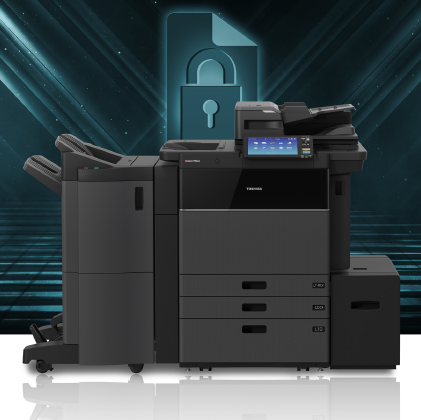
Toshiba eStudio multifunction copier in front of a security background to demonstrate how secure Toshiba copiers are.
Business people near the copier in the hallway
Common Print-Security Gaps We See

Across industries, the same issues show up again and again:

  • Default admin credentials never changed

  • No secure print release (documents sit unattended)

  • No visibility into print activity

  • Outdated firmware

  • Scans sent via unencrypted email

None of these are rare. All of them are preventable.

Why This Matters More Than Ever

Hybrid work, compliance requirements, and tighter data-privacy expectations mean sensitive documents are moving constantly — digitally and physically.

An unsecured print environment can lead to:

  • Data exposure

  • Compliance violations

  • Internal misuse

  • Reputational damage

And unlike a ransomware attack, print-related breaches often go unnoticed until it’s too late.

What Secure Print Actually Looks Like

Print security isn’t about fear — it’s about control.

MCC helps organizations implement:

  • User authentication at the device

  • Secure print release (nothing prints until the user is present)

  • Device and firmware security best practices

  • Visibility into print behavior and usage

  • Document workflows aligned with compliance requirements

All tailored to your existing environment.

Businessman in office working with copier. Image for Office Equipment/Copiers/Printers pages of the Document Solutions section of the MCC website
End-of-Year Is the Right Time to Fix This

Many organizations review vendors, systems, and risks before the new year. Print security should be part of that conversation — not an afterthought.

If your printers touch sensitive data (and they do), they deserve the same attention as the rest of your network.

Print Security FAQs

What is print Security?

Print security refers to the measures used to protect printers, printed documents, and document workflows from unauthorized access, data exposure, and misuse. This includes secure print release, user authentication, encryption, device management, and visibility into print activity.

Why are printers considered a security risk?

Modern printers are network-connected devices that store and transmit data. If left unsecured, they can expose sensitive documents, allow unauthorized access, or create vulnerabilities within a company’s network.

How can businesses secure their printers?

Businesses can secure printers by using user authentication, secure print release, regular firmware updates, encrypted document transmission, access controls, and monitoring print activity as part of a managed print or document security strategy.

What is secure print release?

Secure print release requires users to authenticate at the printer before documents are printed. This prevents sensitive documents from being left unattended and reduces the risk of unauthorized access.

Does managed print services include security?

Yes. Managed Print Services can include print security features such as device management, secure print release, user authentication, reporting, and compliance-friendly document workflows, depending on the solution design.

Print Security and Compliance FAQs

How does print security support compliance requirements?

Print security helps reduce risk by controlling who can print, scan, or access documents, and by improving visibility into document handling. These controls support compliance programs by reducing exposure of sensitive data and improving accountability.

The most impactful features typically include secure print release, user authentication, encryption, access controls, device management (including firmware updates), and reporting/audit visibility into printing and scanning activity.

Can print activity be tracked for audits or investigations?

Yes. Many managed print and secure print solutions provide reporting that helps organizations see who printed or scanned documents, when activity occurred, and which devices were used—useful for internal reviews and compliance workflows.

How can we reduce the risk of sensitive documents being left on the printer?

Secure print release is one of the best safeguards. Documents do not print until the authorized user authenticates at the device, which helps prevent accidental exposure and reduces the chance of unauthorized viewing.

Do we need to replace our printers to improve compliance?

Not always. In many cases, compliance-friendly security improvements can be implemented through configuration, authentication methods, secure print workflows, device management, and software—depending on your current environment and requirements.

Ready to Review Your Print Environment?

MCC offers print-security assessments and proposal-based solutions designed to fit your organization — not force change where it isn’t needed.